Creating a Sub-Album
Updated October 16, 2026
-
Click the Albums icon
 in the left sidebar.
-
Open the Album where you want to place a nested Sub-Album, then click the Add New Album icon
 in the right sidebar.
-
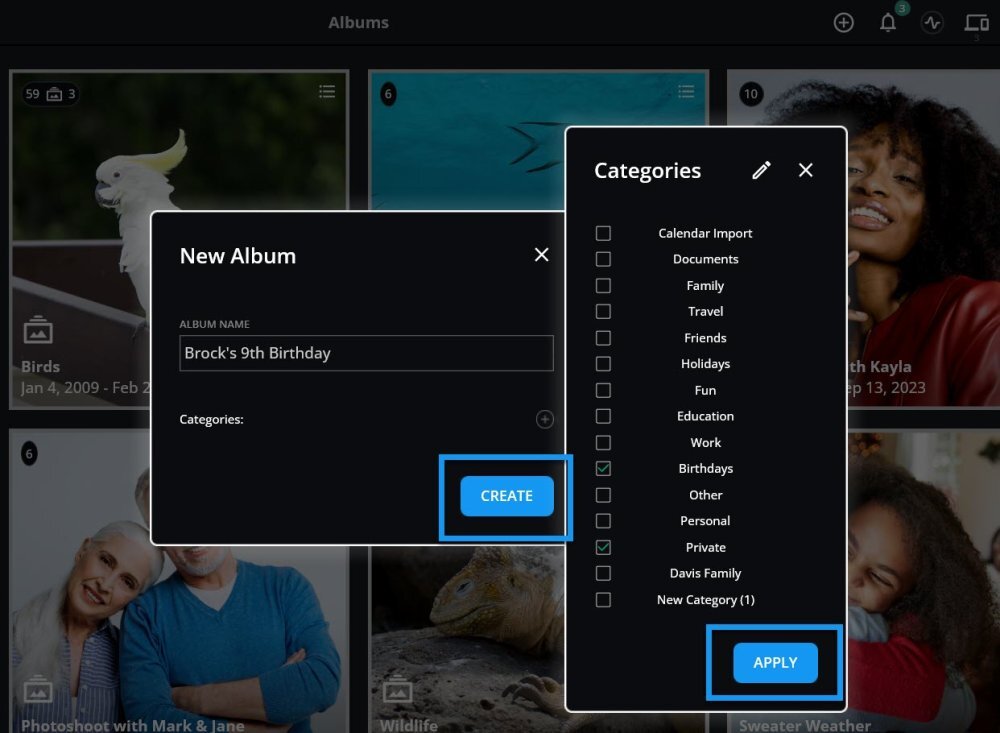
Add an Album Name, assign relevant Categories, and click Apply and Create.
https://mylio-photos.intercom-attachments-1.com/i/o/1162695403/b208f9476db391deec69e45a/v240-c11-s01-f05-en.jpg?expires=1763596800&signature=61b79a591e261e0bde9ff75fb2790b80b84fd43dc1b07ecbd0730dba087976d5&req=dSEhFM93mIVfWvMW1HO4zX5tcaolRDTcL4HNjkdpFW09tu04d1EARrFsZItC%0ArOblWp%2BonIKB1n%2FlVZE%3D%0A
Learn More: https://manual.mylio.com/topic/create-nested-sub-albums
Was this article helpful?
Thank you — your answer helps us decide what to rewrite.



